I’m into running lately. So quite often I do these calculations in my head “if I ran 10 secs/km faster, what distance would I have covered?” As the calculation are quite difficult and I am quite lazy, here’s a calculator that answers most of my questions. Posting it here for personal use, but maybe it’ll be useful to someone else too.
Usage: fill in any two textboxes and click “calculate” next to the third one.
I had some free time this weekend and wanted to mess around with Google API. Ultimately I wanted to work with Analytics, but decided to start with something simpler (like UrlShortener) to reduce possible beginner’s pain. I was fortunate to decide so, because I spent a couple of hours in debugging anyway.
Google API documentation is weird. It has this short Getting Started guide for Ruby, which contains only a few basic steps. Actual documentation is expressed in the universal language of GET/POST requests (to be as language-agnostic as possible). A poor ruby newcomer is basically left to his own devices, there will be little to no help from google.
Let me share some things I learned. Basic consumption of an API looks like this:
Looks simple, right? Yeah. It also doesn’t work. You’ll get an error when you try to run this.
1234
ArgumentError:Missingaccesstoken.from/Users/sergio/.gem/ruby/2.1.5/gems/signet-0.6.0/lib/signet/oauth_2/client.rb:1009:in`generate_authenticated_request' from /Users/sergio/.gem/ruby/2.1.5/gems/google-api-client-0.8.2/lib/google/api_client/request.rb:241:in `to_env'...
Documentation forgot to mention that you need to disable authorization in the client.
It looks like an error. And it seems to be saying that I somehow did not specify longUrl parameter. But I did! Also, what’s up with resource in resource.longUrl. After much googling, some more reading of their gem sources and some debugging on top of that, I was able to figure this out.
You see, urlshortener.url.insert is supposed to be a POST request. And it is correctly sent by the client gem. The only problem is with arguments. parameters key is what goes into query string for GET requests. But POST requests expect data in request body. Theoretically speaking, the gem could be smart enough to serialize parameters as a body if request method is “POST”. Sadly, it’s not the case. The secret is to use body_object key.
body_object will be serialized to request body. This will also set a correct “Content-Type” request header (“application/json”).
I spent several hours and didn’t find a hint of a hint to this in the docs. I know, maintaining good APIs is hard and maintaining good docs is even harder, but isn’t google supposed to be example to us all? :)
I normally don’t write feature specs a lot, because usually the process is a bit of a pain. Especially when you’re trying to cover an existing legacy page with feature specs. Here’s one little trick that made my work a log easier, hopefully it will help you too :)
The problem is that sometimes the spec fails and you get a vague idea why (element by selector is not found or something like that), but by the time an error is printed, the browser window is long gone (you see the browser if you use selenium capybara driver, for example). So you want to pause a test and dig around, find out what goes wrong.
Capybara provides you with a page object which you can use to interact with the browser (click buttons, find elements, etc.), but I found it very inconvenient for quick poking around. Well, turns out (I didn’t know this before) that you can pause a test with something like binding.pry or sleep. Then you can inspect the page under test in the browser which will be left open and not frozen (it’s the separate process, so when main test process sleeps, browser is unaffected). Developer tools of modern browsers are fantastic, so it’s a shame not to use them.
Oh yes, you can also use this technique to do repeating test setup. Say, the business reports a bug to you, you want to test it, but you don’t want to keep a permanent feature spec (they’re dog slow). What you can do is create a temporary test that will set everything up (create three different types of accounts, two projects and what not) and just put a binding.pry at the end. From then you can tail log/test.log and test the site manually. After you’re done with the bug, you just delete the test and commit the changes.
Anyway, I hope this is googlable and will save somebody some time.
A couple of days ago I finally got my invite to Atom editor. A bit late, but I still was excited.
It makes overall positive impression and has some essential things bundled (save on lost focus, trim trailing whitespaces, etc.) But still there are some things lacking. So I decided to check out its praised extensibility.
Again, docs look good and cover some first steps. But I spent a good couple of hours today, trying to invoke my custom command.
process in the listing above is a simple action. It gets current editor and inserts string “hello” at the cursor. I defined an editor shortcut, like this:
12
'.editor':'cmd-ctrl-shift-e':'myext:process'
where myext is the name of my extension. But upon pressing the hotkey, nothing happened. A couple of hours later I got the solution. My mistake was in assuming that Atom will somehow discover and dynamically call that exported method process. It’s exported for a reason, right? Well, no. It turns out that you have to bind commands manually.
Large Rails apps have large locale .yml files. Some have files so large that it is not feasible to simply open them in editor and work with them. Sure, you can edit them just fine, but you can’t efficiently search them.
Say, you’re implementing a new page. It has “Balance” (for example) field on it. You think: “Hm, we have several other pages with this field. Surely, it had been I18n’d before. Let’s look in locale files”. You open 10 kLOC en-US.yml file, start searching and find 15 entries of “balance:” string, with varying levels of indentation. What are the full names of these keys? You have no idea.
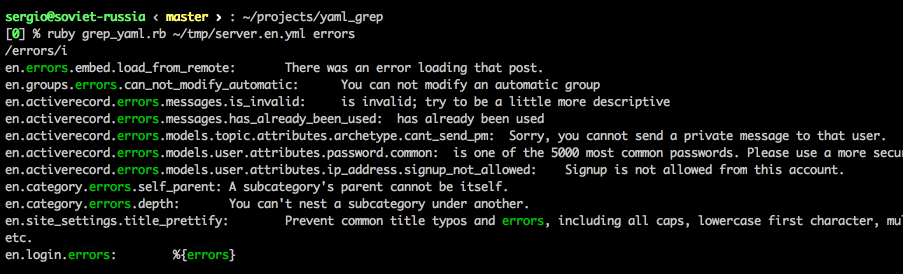
I googled for quite a while and, to my surprise, haven’t found a yaml browser with search, which would show me FQN of a key. Here’s my little script that I wrote to help me in navigating these ginormous files:
Example usage (grep one of locale files of Discourse project):
Much more comfortable, isn’t it?
The source is uploaded as gist, for your copying/forking convenience. I should probably make a proper rubygem out of it. But, you know, when the immediate problem is solved, there are always more important things to work on. :/
There is this good feature in OSX, called Notification Center (which Apple may have stolen from Growl, who knows). It has an API, so you can post your events there. If you’re using Xcode and Apple frameworks, then you can stop reading now. However, if you’re programming in, say, ruby, you’re in much less fortunate position. There’s no official gem or library, so you are left on your own.
But don’t despair, we have you covered. There’s a cocoa app called terminal-notifier that serves as a bridge between Notification Center and your app. It is accessible via command line and is quite configurable. There’s also a ruby gem that wraps this tool, but the main value is that it is available in command line. Which means that you can use it from whatever language you want. For example, I use it in my stackoverflow question poller which is written in Go.
Just a couple of days ago I blogged about Dash. And now they have released new major version, with (at least one) new feature: cheatsheets. One of the things I just can’t hold in my memory is HTTP status codes. I know 200 and 404, that’s it. All others I have to look up, every single time. And Dash has a cheatsheet for this, so I am covered here.
There is no cheatsheet for Vim, not even on its movements. But good news is: you can create your own: cheatset.
I shall probably create one for TextMate key shortcuts (I should know most of them by now, I guess). We’ll see.
Today I just wanted to share some tools that I use to read documentation.
First one is Dash. It’s an offline documentation browser which contains many different topics. It has ruby, rails, CSS, HAML, jQuery, Go, Haskell and everything else you might want. It can also index locally installed rubygems. And did I mention that it is offline? If you’re anything like me, you need to consult documentation every 30 seconds. And with this tool you can even work on a plane! Can’t recommend enough.
Another one is for ruby only, OmniRef. These guys have indexed every ruby gem there is and cross-linked the documentation. On the site you can easily switch between version of a gem (or ruby) and see how documented behaviour and/or code changed over time. It also allows leaving notes (user generated content?), but I don’t see many notes at the moment. Potentially, these comments can be an excellent complement to the official documentation (we see this with, say, MySQL docs).
And, of course, the most important tool for me these days is StackOverflow. More than half of my google searches lead to this chest of collective programming wisdom. The funniest moments are when I struggle with something, then google points me to stackoverflow where I find an answer that I posted myself some time ago. Can you believe this? :)
MongoDB is becoming even more popular than it is now. More people want to learn about it. So I was preparing a seminar for this company and I had to compile a list of MongoDB limits. I never knew there were so many! Some of them are reasonable, some are weird. Anyway, it’s good to know them. Here’s a list of MongoDB limits as of version 2.4.9:
Max document size: 16 MB (we all knew this one, right?)
Max document nesting level: 100 (documents inside documents inside documents…)
Namespace is limited to ~123 chars (namespace is db_name + collection_name (or index_name))
DB name is limited to 64 chars
Default .ns file can store about 24000 namespaces (again, a namespace is referring to a collection or an index)
If you index some field, that field can’t contain more than 1024 bytes
Max 64 indexes per collection
Max 31 fields in a compound index
fulltext search and geo indexes are mutually exclusive (you can’t use both in the same query)
If you set a limit of documents in a capped collection, this limit can’t be more than 2**32. Otherwise, number of documents is unlimited.
On linux, one mongod instance can’t store more than 64 TB of data (128 TB without journal)
On windows, mongod can’t store more than 4 TB of data (8 TB without journal)
Max 12 nodes in a replica set
Max 7 voting nodes in a replica set
You can’t automatically rollback more than 300 MB of data. If you have more than this, manual invervention is needed.
group command doesn’t work in sharded cluster.
db.eval() doesn’t work on sharded collections. Works on unsharded, though.
$isolated, $snapshot, geoSearch don’t work in a sharded cluster.
You can’t refer db object in $where functions.
If you want to shard a collection, it must be smaller than 256 GB, or else it will likely fail to shard.
Individual (not multi) updates/removes in a sharded cluster must include shard key. Multi versions of these commands may not include shard key.
Max 512 bytes for shard key values
You can’t change shard key for a collection once it’s sharded.
You can’t change value of a shard key of a document.
aggregate/$sort produces error if sorting takes more than 10 percent of RAM.
You can’t use $or in 2d geo queries
You better not use queries with multiple $in parts. If this results in more than 4 million combinations - you get error.
Database names are case-sensitive (even on case-insensitive file systems)
Forbidden characters in database names: linux - /. “, windows - /. “*<>:|?
Forbidden characters in collection names: $ sign, “system.” prefix
Here is an interesting problem: write a program that converts numbers into Roman numerals. Roman didn’t use Arabic numbers. Instead they used symbols of Latin alphabet that represented different values. It’s a simple system. “I” stands for 1, “V” stands for 5, “X” for 10 and so on. To represent 2 you have to use “II” (1 + 1), to represent 7 you use “VII” (5 + 1 + 1). Simple, right? Well, no. Here’s a twist.
* 4 is "IV" (not "IIII")
* 9 is "IX" (not "VIIII")
* 40 is "XL" (not "XXXX")
* 49 is "XLIX" (not "XXXXVIIII")
Weird, huh? Maybe they didn’t like 4 identical symbols in a row, who knows. Anyway, how can we solve this?
After trying out several “smart” solutions and failing, I’ve come up with this simple solution: store these special cases along with normal ones and keep subtracting from the number until it’s zero.
defromanize(number)reductions={1000=>'M',900=>'CM',500=>'D',400=>'CD',100=>'C',90=>'XC',50=>'L',40=>'XL',10=>'X',9=>'IX',5=>'V',4=>'IV',1=>'I',}result=''whilenumber>0reductions.eachdo|n,subst|ifnumber/n>=1# if number contains at least one of nresult<<subst# push corresponding symbol to resultnumber-=nbreak# break from each and start it anew # so that the largest numbers are checked first again.endendendresultend
This simple problem took me a little bit over 2 hours to come up with this (simple) solution. Too bad, that often we, programmers, don’t have time to look for simple solutions and we go for the easiest one.